Playrooms Difficulty Modes: Cozy, Normal and Hardcore
Compare Cozy, Normal and Hardcore using the official mode screen, including monsters, day restarts and Hardcore save deletion.
Can you play Playrooms without monsters?
Yes. Cozy is already available in the demo, and the developer explicitly confirmed that it has no monsters. It is the appropriate option when you want the collection loop but do not want monster encounters. You do not need to wait for a hypothetical separate non-horror edition.
This answers a real player request: someone said they would buy a version without the horror, and Two Pixels UG pointed them to the existing mode. Developer confirmation.
What changes between the three modes?
The official Steam mode-selection screenshot distinguishes the consequence of the day ending or the player being caught. Cozy provides safe return, Normal repeats the day after capture, and Hardcore makes capture a save-ending event. Choose on that basis rather than assuming Hardcore only increases a numerical difficulty setting.
| Mode | Officially shown behavior |
|---|---|
| Cozy | Removes horror; when the lights-out day ends, players outside return safely |
| Normal | Capture restarts the day |
| Hardcore | Capture deletes that save; progress begins again from scratch |
These are paraphrases of the official mode-screen screenshot, not results from our own death tests.
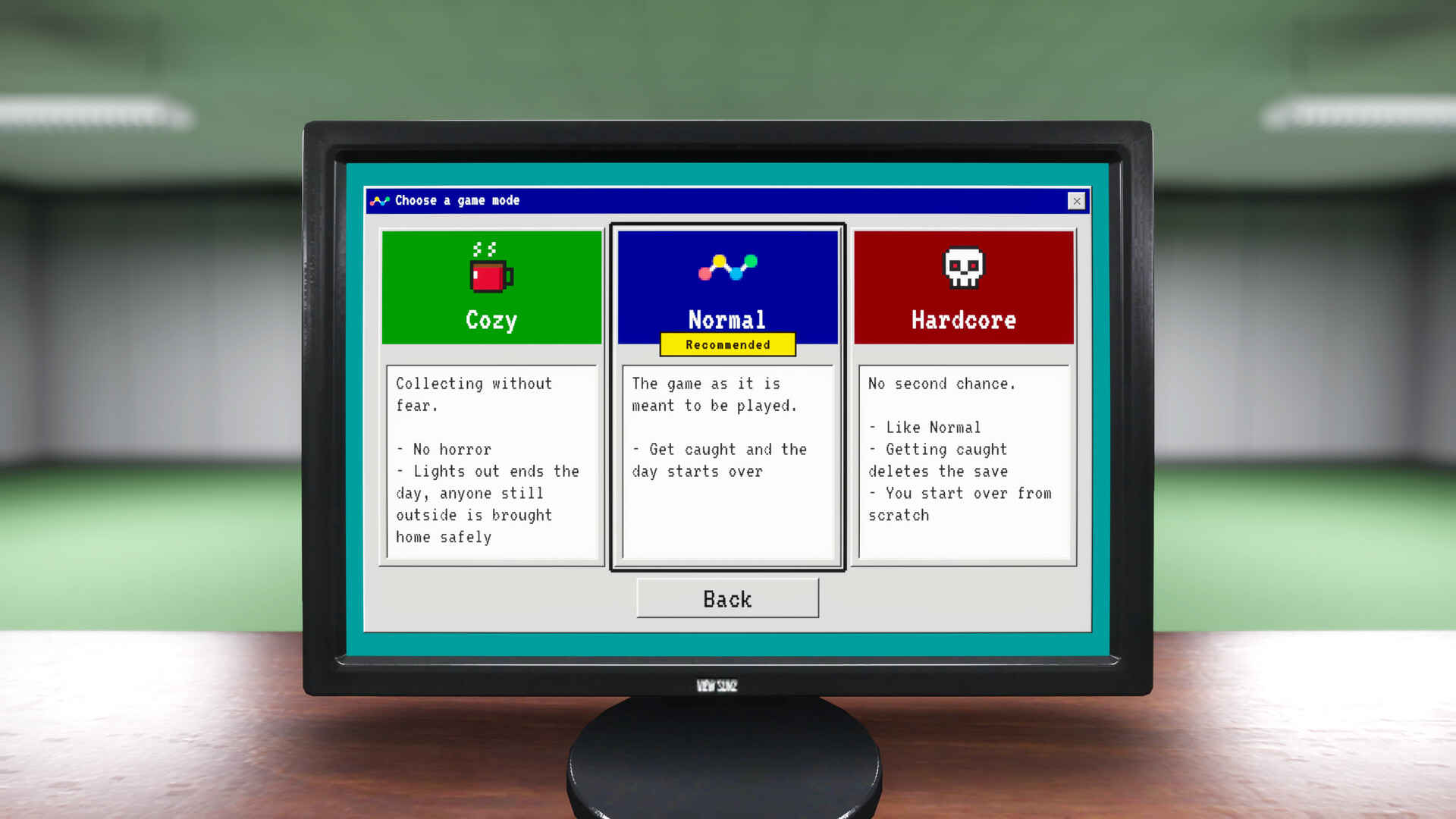
Official promotional screenshot from the Steam listing. Read the current build’s mode description before starting a run.
Does Cozy remove the day-and-lighting cycle?
The mode screen still describes a day ending when lights go out, with safe return for anyone still outside. Cozy therefore should not be described as an unlimited shift or a setting that disables the whole daily cycle. Its confirmed difference is the removal of horror and safe handling of that transition.
If you dislike time pressure as well as monsters, try the free demo and judge the pacing directly. A separate shift-duration setting, instant end-day command or unrestricted day length has not been verified here.
What should you check before starting Hardcore?
Read the selected mode and choose the intended save slot before beginning. The official description gives Hardcore a much larger consequence than a repeated day: capture deletes the save. Do not treat it as a harmless temporary option while experimenting with an existing run.
See save slots, Cloud and demo progress for the distinction between separate slots, synchronization and transfer. The developer’s October 20 demo patch also improved how mode selection is highlighted. Official controls patch.
This guide does not confirm switching difficulty during an existing save. For unavailable movement actions rather than mode selection, use sprint and crouch.
Checked November 2, 2026; verify the current in-game description if a later build changes these rules.
Related Articles
guides
Playrooms Broom Guide: Getting Balls to the Waiting Room Vent
Find out why the Waiting Room suction point needs a broom, what the developer confirms, and which demo limitations remain unresolved.
guides
Playrooms Beginner Guide: Depositing Balls, Tools and First Shifts
Start the Playrooms demo with the correct deposit action, tool prompts and upgrade information, then choose the right difficulty and save slot.
guides
How to Drop Balls in Playrooms: Deposit Controls Explained
Put carried balls into a pool with the developer-confirmed control, and learn why Playrooms has no separate drop key.
Was this helpful?
Thanks for the feedback!