Playrooms Upgrades and Coffee: Reading the Skill Effects
Understand the skill menu, Ball Magnet, collection trade-offs and the coffee machine's current-versus-next upgrade descriptions.
How should you compare an upgrade before buying it?
Compare the effect you have now with the effect the next purchase adds. In the October 13 demo update, the developers separated the coffee machine’s active, next and later upgrade information. That makes a preview of a future benefit easier to distinguish from an effect already active.
Use the current build’s descriptions when making a purchase. This page provides a way to read them; it is not a price list copied from an older screenshot or a claim that every upgrade should be bought immediately.
Official upgrade-description update.
What does the official skill-menu screenshot establish?
The Steam screenshot shows a computer skills.exe window containing hand-collection entries including Big Pockets, Quick Grab, Vacuum Collect and Ball Magnet. The selected Ball Magnet description concerns collecting additional nearby balls when picking one up. This supports the mechanism, not a complete current balance table.
The same screenshot includes a Quick Hands entry under a ball-pit heading. Be careful with similar labels: a menu label in a promotional screenshot should not automatically be equated with another name used in patch notes.
Official Steam screenshot gallery.
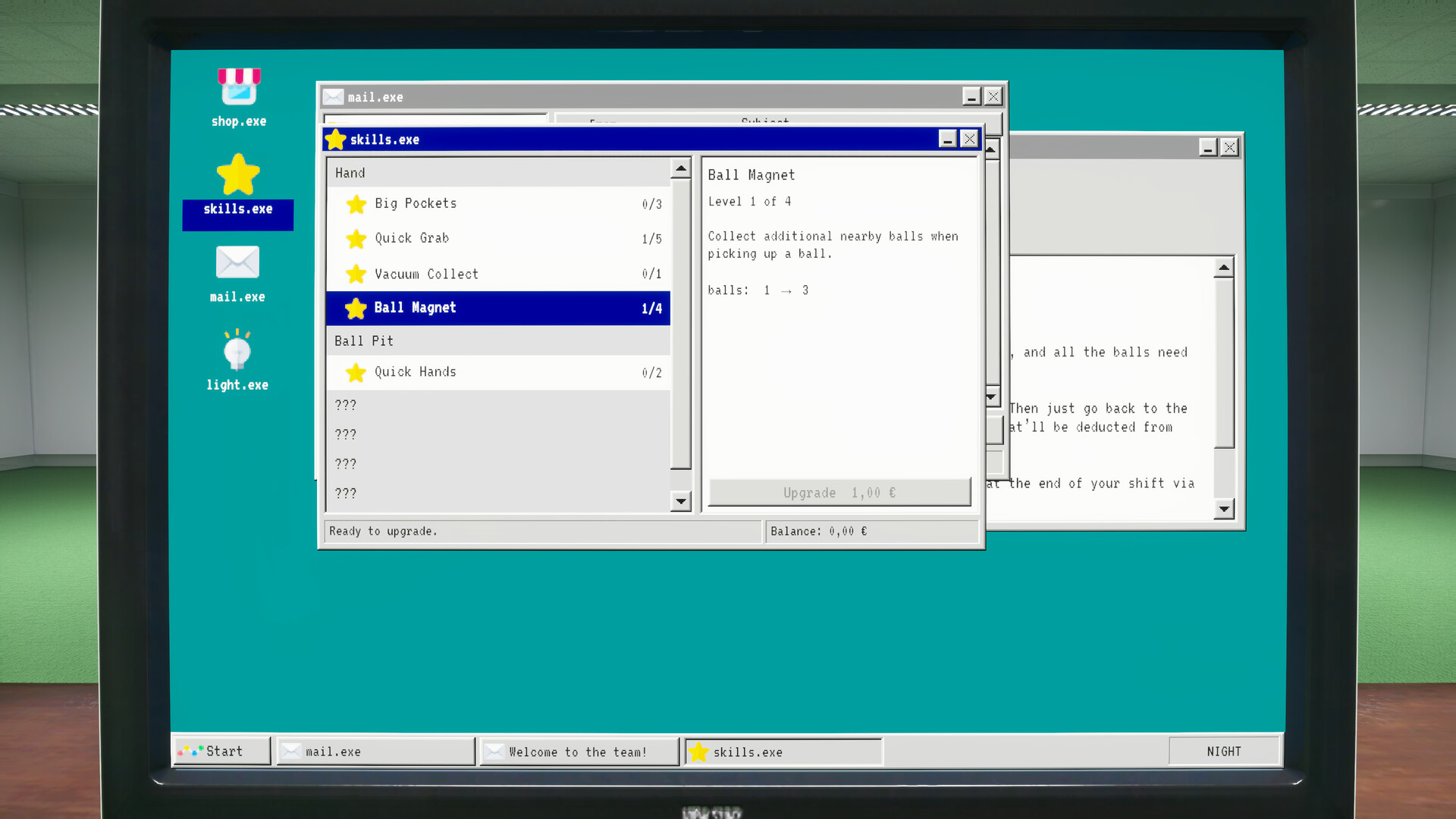
Official promotional screenshot. Its displayed levels and prices are an example from that image, not a verified table for every current build.
For a practical comparison, ask what is limiting your current task: collection, transport, depositing or access to another area. Read the relevant description instead of assuming that a displayed upgrade affects every stage.
What changed in the coffee and collection-speed displays?
The October 13 notes say Nimble Hands is expressed in balls per second and that coffee duration uses a clock-style display. They also distinguish present coffee effects from the next purchase and later upgrades. Those display changes help interpret the menu without supplying unverified numerical bonuses.
Check three things before spending on coffee:
- Which benefits are already listed as active?
- What does the next purchase add?
- Is the displayed time a duration rather than a percentage or currency value?
We have not verified a complete coffee-effect tree, refresh behavior or optimal timing. Do not read a later-upgrade preview as a benefit the current purchase grants.
When can a faster collection upgrade conflict with your goal?
If you want deliberate color sorting, bulk collection can work against you. Developers explain that hand selection without multi-collection is the relevant method, and they have also acknowledged color-tracking bugs. More balls per action and more control over individual colors are different goals.
Read the color-sorting limitations before upgrading a save specifically for sorting. For normal room cleanup, the Waiting Room broom solves a different collection task.
Movement permissions are separate again: see sprint, crouch and stamina if a movement key seems inactive.
Checked November 2, 2026. Full-game balance may differ from demo and promotional material.
Related Articles
guides
Playrooms Broom Guide: Getting Balls to the Waiting Room Vent
Find out why the Waiting Room suction point needs a broom, what the developer confirms, and which demo limitations remain unresolved.
guides
Playrooms Difficulty Modes: Cozy, Normal and Hardcore
Compare Cozy, Normal and Hardcore using the official mode screen, including monsters, day restarts and Hardcore save deletion.
guides
Playrooms Beginner Guide: Depositing Balls, Tools and First Shifts
Start the Playrooms demo with the correct deposit action, tool prompts and upgrade information, then choose the right difficulty and save slot.
Was this helpful?
Thanks for the feedback!